
Introduction
I haven’t been posting much over the past few years: a new job has seen to that given I have only time out of work left to me to post.
Comment about AI
Also, it would appear to me, with the rise of AI agents, a lot of the detail of a post, or even the source code I make available, is now capable of being generated without descriptions like this one. Though such articles do get ingested by LLMs (I’ve seen references to my own work in responses by AI agents).
As we know AI is effectively scraping existing ideas to formulate responses. These inputs are:
* My own articles!
* My own source code (see github).
* Public help and API documentation available on the web
* Forum posts (which often generate rabbit holes that lead no-where!)
* Blog articles
* Research papers.
In working with AI on implementing this idea (which has been gestating for over 20 years) – and it was a great experience as it cut down development time enormously – I have to say that the person asking the questions of an AI Agent has to be clear about what they want (the perennial problem in IT) by providing clear statements of requirements, intent and approach: one must have a certain amount of domain knowledge!
But I have noticed that preliminary solutions provided by AI (eg “Please create me a TSQL function to do XXX?”) often miss edge-cases particularly when processing spatial data but if you have enough domain knowledge you can normally get this detail fleshed out reasonably quickly.
But I am telling you, the reader, how to suck eggs!
Anyway, on to the article.
Requirement
To take a 2D road network stored as PostGIS LineStrings, convert them into 2.5D linestring equivalents by interpolating Z values (requires a function to do this) through processing the vertices of a linestring against a Triangulated Irregular Network (TIN) facet geometry derived from a grid of XYZ ground points.
Purpose
To enable the determination of the relative slope of a road line as a possible method for improving road directions.
Tools
All processing will be done in PostgreSQL/PostGIS.
Data
The data that formed the inputs for this article were the following publicly available datasets:
* A grid of XYZ ground points that covers the whole state of Tasmania;
* Transportation linestrings that define the centerlines for all roads in Tasmania;
* The polygon dataset of Local Government Areas of Tasmania.
Functions
Some Pl/PgSQL functions were created to enable the forming of TIN triangle polygons (called facets from now on) from three XYZ points, and to interpolate the Z value of an XY point within a facet.
Here are all the function headers (the code is available on github for free or via a download of the PostGIS functions from my shop):
CREATE OR REPLACE FUNCTION spdba.ST_InterpolateZ(
    p_point in geometry,
    p_geom1 in geometry,
    p_geom2 in geometry,
    p_geom3 in geometry
)
RETURNS float
LANGUAGE 'plpgsql'
AS $$
/****f* GEOPROCESSING/ST_InterpolateZ
*  NAME
*    ST_InterpolateZ - Takes a 2D point and a 3D triangle (facet) and interpolates a Z ordinate value.
*  SYNOPSIS
*    Function ST_InterpolateZ(
*                p_point  in geometry,
*                p_geom1 in geometry,
*                p_geom2 in geometry,
*                p_geom3 in geometry
*    )
*    Returns float;
*  DESCRIPTION
*    This function takes a 2D point and a 3D triangle (facet in a triangulated mesh)
*    and returns an interpolated Z ordinate value. The Z is computed via barycentric
*    interpolation over the plane defined by the triangle's three 3D corner points, so
*    it is exact for any point on that plane -- including points outside the triangle's
*    footprint, which are extrapolated rather than rejected (this mirrors the original
*    Oracle/SDO_GEOMETRY implementation's behaviour: containment must be checked by the
*    caller beforehand, e.g. with ST_Contains/ST_Within against the facet's 2D footprint).
*  ARGUMENTS
*    p_point (geometry) - Point for which the Z ordinate's value is to be computed.
*                          Only X/Y are used; it may be 2D or 3D.
*    p_geom1 (geometry) - First corner point of the facet. Must be a 3D (XYZ) point.
*    p_geom2 (geometry) - Second corner point of the facet. Must be a 3D (XYZ) point.
*    p_geom3 (geometry) - Third corner point of the facet. Must be a 3D (XYZ) point.
*  EXAMPLE
*    SELECT ST_InterpolateZ(
*             ST_SetSRID(ST_MakePoint(50, 50),          28355),
*             ST_SetSRID(ST_MakePoint(0,   0,   10),    28355),
*             ST_SetSRID(ST_MakePoint(100, 0,   20),    28355),
*             ST_SetSRID(ST_MakePoint(50,  100, 30),    28355)
*           ) AS interpolated_z;
*    -- interpolated_z = 22.5
*  RESULT
*    Z value (float) - Result of interpolation
*  ERRORS
*    Can throw one or other of the following exceptions:
*      ST_InterpolateZ: One or other of supplied geometries is NULL.
*      ST_InterpolateZ: SRIDs of geometries must be equal.
*      ST_InterpolateZ: Point geometry is empty.
*      ST_InterpolateZ: First/Second/Third facet geometry is empty.
*      ST_InterpolateZ: The point geometry should be a point.
*      ST_InterpolateZ: All three facet geometries should be points.
*      ST_InterpolateZ: The three facet geometries must have a Z value.
*      ST_InterpolateZ: The three facet points are collinear: cannot form a plane.
*      ST_InterpolateZ: <Message> (any other unexpected error, wrapped with SQLERRM).
*  AUTHOR
*    Simon Greener
*  HISTORY
*    Simon Greener - March 2012  - Original Oracle/PL-SQL coding (mdsys.sdo_geometry).
*    Simon Greener - August 2026 - Ported to PostgreSQL/PostGIS: parameters changed from
*                                  mdsys.sdo_geometry to PostGIS geometry, coordinate
*                                  access via ST_X/ST_Y/ST_Z, validity checks adapted to
*                                  ST_IsEmpty/ST_GeometryType/ST_Z IS NULL, and interpolation
*                                  implemented directly as barycentric weights.
*  COPYRIGHT
*    (c) 2005-2026 by TheSpatialDBAdvisor/Simon Greener
*  NOTES
*    LICENSE is Creative Commons Attribution-Share Alike 2.5 Australia License.
*               http://creativecommons.org/licenses/by-sa/2.5/au/
******/
DECLARE
  ...
BEGIN
  ...
END $$;

CREATE OR REPLACE FUNCTION spdba.ST_InterpolateZ(
    p_point in geometry,
    p_facet in geometry
)
RETURNS float
LANGUAGE 'plpgsql'
AS $$
/****f* GEOPROCESSING/ST_InterpolateZ (Facet)
*  NAME
*    ST_InterpolateZ - Takes a 2D point and a 3D triangle (facet) and interpolates a Z ordinate value.
*  SYNOPSIS
*    Function ST_InterpolateZ(
*                p_point in geometry,
*                p_facet in geometry
*    )
*    Returns float;
*  DESCRIPTION
*    This function takes a 2D point and a 3D triangle (facet in a triangulated mesh)
*    and returns an interpolated Z ordinate value. The Z is computed via barycentric
*    interpolation over the plane defined by the triangle's three 3D corner points, so
*    it is exact for any point on that plane -- including points outside the triangle's
*    footprint, which are extrapolated rather than rejected (this mirrors the original
*    Oracle/SDO_GEOMETRY implementation's behaviour: containment must be checked by the
*    caller beforehand, e.g. with ST_Contains/ST_Within against the facet's 2D footprint).
*  ARGUMENTS
*    p_point (geometry) - Point for which the Z ordinate's value is to be computed.
*                          Only X/Y are used; it may be 2D or 3D.
*    p_facet (geometry) - 4 Point Polygon3D
*  EXAMPLE
*    SELECT ST_InterpolateZ(
*             ST_SetSRID(ST_MakePoint(50, 50),          28355),
*             ST_FromEWKT('SRID=28355,POLYGON((0 0 10,100 0 20, 50 100 30, 0 0 10))')
*           ) AS interpolated_z;
*    -- interpolated_z = 22.5
*  RESULT
*    Z value (float) - Result of interpolation
*  ERRORS
*    Can throw one or other of the following exceptions:
*      ST_InterpolateZ: One or other of supplied geometries is NULL.
*      ST_InterpolateZ: SRIDs of geometries must be equal.
*      ST_InterpolateZ: Point geometry is empty.
*      ST_InterpolateZ: First/Second/Third facet geometry is empty.
*      ST_InterpolateZ: The point geometry should be a point.
*      ST_InterpolateZ: Should be 4 point 3d Polygon
*      ST_InterpolateZ: The three facet geometries must have a Z value.
*      ST_InterpolateZ: The three facet points are collinear: cannot form a plane.
*      ST_InterpolateZ: <Message> (any other unexpected error, wrapped with SQLERRM).
*  AUTHOR
*    Simon Greener
*  HISTORY
*    Simon Greener - March 2012  - Original Oracle/PL-SQL coding (mdsys.sdo_geometry).
*    Simon Greener - August 2026 - Wrapper function
*  COPYRIGHT
*    (c) 2005-2026 by TheSpatialDBAdvisor/Simon Greener
*  NOTES
*    LICENSE is Creative Commons Attribution-Share Alike 2.5 Australia License.
*               http://creativecommons.org/licenses/by-sa/2.5/au/
******/
DECLARE
  ...
BEGIN
  ...
END $$;

CREATE OR REPLACE FUNCTION spdba.ST_FacetFromPoints(p_geom1 geometry, p_geom2 geometry, p_geom3 geometry)
RETURNS geometry
LANGUAGE plpgsql
AS $$
/****f* GEOPROCESSING/ST_FacetFromPoints
*  NAME
*    ST_FacetFromPoints - Takes three 3D point and creates a triangle (facet)
*  SYNOPSIS
*    Function ST_FacetFromPoints(
*             p_geom1 in geometry,
*             p_geom2 in geometry,
*             p_geom3 in geometry
*    )
*    Returns geometry;
*  DESCRIPTION
*    This function takes three 3D points (XYZ) and creates a single 3D triangle (facet in a triangulated mesh)
*  ARGUMENTS
*    p_geom1 (geometry) - First corner point of the facet. Must be a 3D (XYZ) point.
*    p_geom2 (geometry) - Second corner point of the facet. Must be a 3D (XYZ) point.
*    p_geom3 (geometry) - Third corner point of the facet. Must be a 3D (XYZ) point.
*  EXAMPLE
*    SELECT ST_AsText(ST_InterpolateZ(
*             ST_SetSRID(ST_MakePoint(0,   0,   10),    28355),
*             ST_SetSRID(ST_MakePoint(100, 0,   20),    28355),
*             ST_SetSRID(ST_MakePoint(50,  100, 30),    28355)
*           )) AS facet;
*    POLYGON((0 0 10,100 0 20,50 100 30,0 0 10))
*  RESULT
*    facet  (geometry) - 3D Triangular polygon
*  ERRORS
*    Can throw one or other of the following exceptions:
*      ST_InterpolateZ: One or other of supplied geometries is NULL.
*      ST_InterpolateZ: The three facet geometries must have a Z value.
*      ST_InterpolateZ: SRIDs of geometries must be equal.
*      ST_InterpolateZ: All three facet geometries should be points.
*      ST_InterpolateZ: The three facet points are collinear: cannot form a plane.
*  AUTHOR
*    Simon Greener
*  HISTORY
*    Simon Greener - March 2012  - Original Oracle/PL-SQL coding (mdsys.sdo_geometry).
*    Simon Greener - August 2026 - Ported to PostgreSQL/PostGIS: parameters changed from
*                                  mdsys.sdo_geometry to PostGIS geometry, coordinate
*                                  access via ST_X/ST_Y/ST_Z, validity checks adapted to
*                                  ST_IsEmpty/ST_GeometryType/ST_Z IS NULL, and interpolation
*                                  implemented directly as barycentric weights.
*  COPYRIGHT
*    (c) 2005-2026 by TheSpatialDBAdvisor/Simon Greener
*  NOTES
*    LICENSE is Creative Commons Attribution-Share Alike 2.5 Australia License.
*               http://creativecommons.org/licenses/by-sa/2.5/au/
******/
DECLARE
  ...
BEGIN
  ...
END $$;
Processing
STEP 1: load the raw points from the ground.xyz file.
File: ground.xyz
Example:
x,y,z

545678.0 5377871.0

545678.0 5377896.0

...
This was achieved as follows:
DROP TABLE IF EXISTS gis.raw_points;
CREATE TABLE gis.raw_points (
  id serial,
   x double precision,
   y double precision,
   z double precision
);

copy gis.raw_points(x,y,z) FROM 'C:/data/Manifold/ground.xyz' WITH (FORMAT csv, HEADER true)
This loaded 108,797,388 XYZ points.
STEP 1.1: Confirm the ACTUAL grid spacing between the points.
This is needed for the clever creation of TIN facet polygons from the raw points in the next step.
SELECT (SELECT min(d) FROM (SELECT x - lag(x) OVER (ORDER BY x) AS d FROM (SELECT DISTINCT x FROM gis.raw_points) t) s WHERE d > 0) AS x_spacing,
       (SELECT min(d) FROM (SELECT y - lag(y) OVER (ORDER BY y) AS d FROM (SELECT DISTINCT y FROM gis.raw_points) t) s WHERE d > 0) AS y_spacing;

x_spacing y_spacing
       25        25
STEP 2: Construct TIN facets by Processing the regular grid of points into three point polygons.
Because the points are regularly spaced we don’t need special software (like FME, SAGA, ESRI, qGIS) to form the triangles of a TIN.
Trust me: this is funky! And, credit where credit is due, the triangulation approach using pure SQL was suggested to me by Claude!
STEP 2.1: Assign row/column indices, using the spacing confirmed above
These row/column indicies are used in STEP 3.2 to create the three point TIN facets.
ALTER TABLE gis.raw_points
        ADD COLUMN col integer,
        ADD COLUMN "row" integer,
        ADD COLUMN geom geometry(Point, 28355);

WITH bounds AS (SELECT min(x) AS x0, min(y) AS y0 FROM gis.raw_points)
UPDATE gis.raw_points
   SET col   = round((x - bounds.x0) / 25.0)::int,
       "row" = round((y - bounds.y0) / 25.0)::int,
       geom = ST_SetSrid(ST_MakePoint(x::float,y::float,z::float),28355)
FROM bounds;
And finally set the table so that it can be visualised in qGIS.
ALTER TABLE                                gis.raw_points ADD CONSTRAINT pk_raw_points_id PRIMARY KEY (id);
CREATE UNIQUE INDEX                     ON gis.raw_points (col, "row");
CREATE        INDEX spx_raw_points_geom ON gis.raw_points USING gist (geom) WITH (buffering=auto);
STEP 2.2: Build 2 triangles per grid cell (SW-NE diagonal split)
This is what the following code with achieve:

Every triangle’s 3 corners keep their real (x,y,z) (a true PolygonZ) with no elevation lost and no ambiguity about how the triangulator split a cell.
DROP TABLE IF EXISTS gis.ground_triangles;
CREATE TABLE gis.ground_triangles (id serial, geom geometry(PolygonZ, 28355));   -- set your real SRID

INSERT INTO gis.ground_triangles (geom)
SELECT ST_SetSRID(ST_MakePolygon(ST_MakeLine(ARRAY[
         ST_MakePoint(p00.x, p00.y, p00.z),
         ST_MakePoint(p10.x, p10.y, p10.z),
         ST_MakePoint(p11.x, p11.y, p11.z),
         ST_MakePoint(p00.x, p00.y, p00.z)
       ])), 28355)   -- match the column's SRID, or ST_MakePolygon's output (SRID 0) will be rejected
  FROM gis.raw_points p00
  JOIN gis.raw_points p10 ON p10.col = p00.col + 1 AND p10."row" = p00."row"
  JOIN gis.raw_points p11 ON p11.col = p00.col + 1 AND p11."row" = p00."row" + 1
UNION ALL
SELECT ST_SetSRID(ST_MakePolygon(ST_MakeLine(ARRAY[
         ST_MakePoint(p00.x, p00.y, p00.z),
         ST_MakePoint(p11.x, p11.y, p11.z),
         ST_MakePoint(p01.x, p01.y, p01.z),
         ST_MakePoint(p00.x, p00.y, p00.z)
       ])), 28355)
  FROM gis.raw_points p00
  JOIN gis.raw_points p11 ON p11.col = p00.col + 1 AND p11."row" = p00."row" + 1
  JOIN gis.raw_points p01 ON p01.col = p00.col     AND p01."row" = p00."row" + 1;

-- Create Primary Key and Spatial Index for access by qGIS
ALTER TABLE                               gis.ground_triangles ADD CONSTRAINT pk_ground_triangles_id PRIMARY KEY (id);
CREATE INDEX spx_ground_triangles_geom ON gis.ground_triangles USING GIST (geom);
STEP 3: Upgrading 2D Transportation LineStrings to be LineStringZ
This is achieved by breaking up each linestring in the gis.transport tables by dumping its XY coordinate points, then querying the gis.ground_triangles table to find the nearest TIN facet and using the ST_InterpolateZ(point,facet) function to return the Z ordinate for each point. A 3D vertex is then constructed and the original linestring recompiled as a LineStringZ object.
A simple SQL example shows how a 2D point can be converted into a 3D PointZ:
with data as (
select 'SRID=28355;POINT(606422.5 5333221.5)'::geometry as geom
)
select spdba.ST_InterpolateZ(d.geom,gt.geom) as elevation
  from data as d
       inner join gis.ground_triangles as gt ON ST_Intersects(gt.geom,d.geom);

elevation
  34.5678
NOTE: The gis.transport table’s geom column only contains LineStrings, not MultiLineStrings, CurveStrings, CompoundCurves. The processing of these objects is not covered in this article.
drop table if exists gis.transport25d;
create table gis.transport25d (
  oid  integer,
  geom geometry(LineStringZ,28355)
);
-- Note all other attributes of the original gis.transport table can be accessed via a join based on the common oid column.

WITH exploded AS (
  SELECT t.oid,
         (pt).path AS vpath,
         (pt).geom AS pt
    FROM gis.transport t
         CROSS JOIN LATERAL ST_DumpPoints(t.geom) AS pt
   WHERE EXISTS (
     SELECT 1 FROM gis.ground_triangles gt WHERE ST_Intersects(gt.geom, t.geom)
   )
), zvals AS (
  SELECT e.*,
         /* If vertex doesn't fall in a facet, find nearest and interpolate nearest */
         COALESCE(
           (SELECT spdba.st_interpolatez(e.pt, gt.geom)
              FROM gis.ground_triangles gt
             WHERE ST_Intersects(gt.geom, e.pt)
             LIMIT 1),
           (SELECT spdba.st_interpolatez(e.pt, gt.geom)
              FROM gis.ground_triangles gt
             ORDER BY gt.geom <-> e.pt
             LIMIT 1)
         ) AS z
    FROM exploded e
)
INSERT INTO gis.transport25d (oid, geom)
SELECT oid,
       ST_SetSRID(ST_MakeLine(ST_MakePoint(ST_X(pt), ST_Y(pt), v.z) ORDER BY vpath), 28355) AS geom
  FROM zvals as v
 GROUP BY oid;
-- INSERT 0 261125
-- Query returned successfully in 24 min 42 secs.

-- Enable qGIS access
ALTER TABLE                           gis.transport25d ADD CONSTRAINT pk_transport25d_oid PRIMARY KEY (oid);
CREATE INDEX spx_transport25d_geom ON gis.transport25d USING GIST (geom);
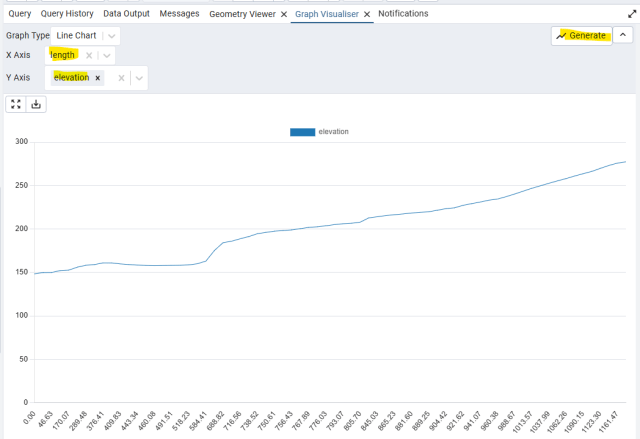
RESULT: Example of a 3D enabled road is shown by this funky use of pgAdmin’s Graph Visualiser capability.
First, create SQL that joins the LineStringZ components of my own street, assigns a measure to the linestring based on length from the start, dumps the points to get the length and elevation values as a table.
- Generate Graph Visualiser based on a road linestring with measure based on length from start and elevation by nearest point method
with lines as (
  -- Create single Cliff View Drive + ROW from components
  SELECT f.oid,
         ST_AddMeasure(f.geom,0.0,st_length(f.geom)) as geom
    FROM (SELECT min(oid) as oid,
                 ST_LineMerge(ST_Union(ST_SnapToGrid(ST_GeometryN(geom,1),0.001))) as geom
            FROM gis.transport25d
           WHERE oid IN (122094,97488,181585,49414)
         ) as f
)
select ROUND(ST_M((d).geom)::numeric,2) as length,
       ROUND(ST_Z((d).geom)::numeric,2) as elevation
  from (select oid,st_dumppoints(geom) as d
          from lines) as f
order by length;

Then use the pgAdmin Graph Visualizer to display the result via a line graph.
BONUS STEP: Create MultiLineStringZM for The Whole State by Merging based on Street Name
Each linestring in the gis.transport table often forms part of an actual road. In the example above Cliff View Drive is actually broken up into 4 segments. We can create a single (possibly MultiLineStringZ) for each street as follows.
drop table if exists gis.roads25D;

create table gis.roads25D (
  id       serial,
  pri_name varchar(60),
  lga_code smallint,
  geom     geometry(MultiLineString,28355)
);

INSERT INTO gis.roads25D (pri_name,lga_code,geom)
SELECT t."PRI_NAME" as pri_name,
       lga.lga_code,
       ST_LineMerge(ST_Union(ST_SnapToGrid(ST_GeometryN(t25d.geom,1), 0.001))) AS geom
  FROM gis.transport25d as t25d JOIN gis.transport as t ON t.oid = t25d.oid
       -- pick ONE LGA per transport row ordered by largest intersected line segment length
       JOIN LATERAL (
         SELECT lga_code
           FROM gis.local_govt_areas AS l
          WHERE ST_Intersects(l.geom, t.geom)
          ORDER BY ST_Length(ST_Intersection(l.geom, t.geom)) DESC
          LIMIT 1
       ) AS lga ON TRUE
GROUP BY t."PRI_NAME", lga.lga_code;
I hope this article was of interest to someone out there.